EstoppelPilot · by Worksub
Estoppel certificates, drafted the day the request lands.
EstoppelPilot reads incoming estoppel requests, finds the parcel in your ledger, fills the Florida statutory certificate with the fee and deadline computed, and leaves a ready-to-sign reply in your drafts folder. Your licensed manager reviews, signs, and sends. EstoppelPilot never sends anything itself.
Works with Google Workspace and Microsoft 365. Nothing changes for the title companies emailing you.
The problem
Ten business days, or the fee is gone.
Florida gives an association ten business days to deliver an estoppel certificate. Miss it and the fee can’t be charged. Every request means the same forty-five minutes: find the parcel, pull the ledger, check for violations and transfer fees, fill twelve statutory items, write the reply — and get it in front of a licensed manager before the clock runs out.
It’s not hard work. It’s deadline work — and it lands on your most experienced people, in the middle of everything else, every closing season.
Estoppel request — 1198 Palm Crest Dr, closing 10/15
From — Alicia Moreno <amoreno@gulfcoasttitle.example>
Good morning — we’re handling the sale of 1198 Palm Crest Dr in Palm Crest HOA, seller Denise Okafor. Please send an estoppel certificate to our office. Closing is set for October 15, so we need it as soon as possible.
How it works
From request to signed certificate, in four steps
- 1
A request comes in
EstoppelPilot watches your estoppel inbox — Google Workspace or Microsoft 365 — and recognizes requests from title companies, lenders, and closing attorneys. Everything else is left alone.
- 2
It finds the parcel — or stops
The association and parcel are matched against the ledger you uploaded. If the parcel isn’t there, or two could match, it asks one precise question instead of guessing.
- 3
It fills the statutory certificate
Every item of the Florida form from your ledger: assessments, paid-through, amounts owed, violations, transfer fees, the fee and the delivery deadline — with the effective period set.
- 4
Your manager signs and sends
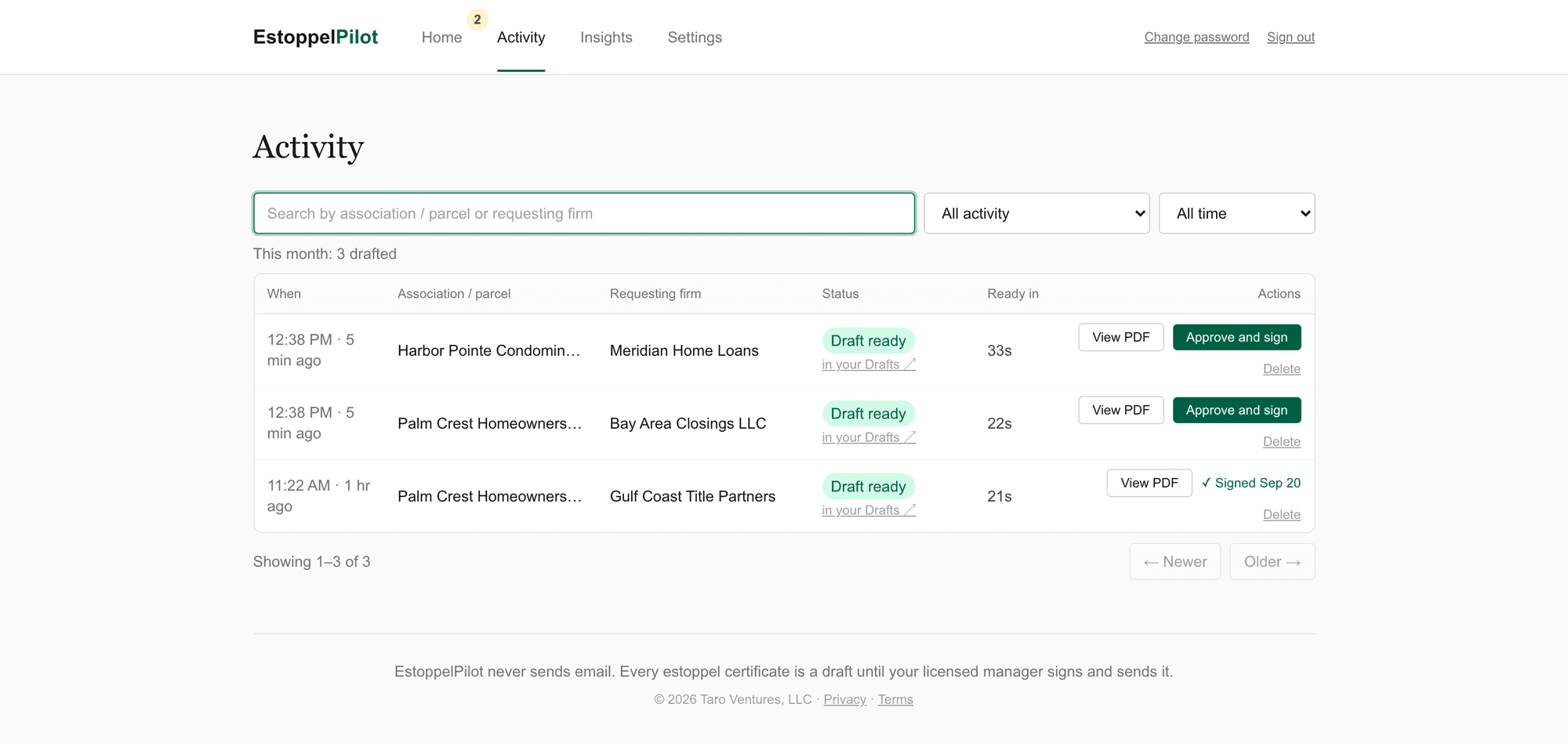
The reply, certificate attached, lands in your drafts folder and in the dashboard. Your licensed manager reviews the PDF, approves and signs with one click, and sends it. Under a minute from request to draft.
The manager’s license
It never sends. Ever. By design.
Never guesses
Parcel not on file? Two owners with the same name? It’s flagged for a person — not answered wrong.
Never touches history
EstoppelPilot only sees mail received after its go-live date. Your archive is off limits.
Access you control
It reads your inbox through access your Workspace or Microsoft 365 admin grants — and can revoke in one click.
Everything logged
Every request, every draft, who signed it and when, timestamped in a dashboard you can open any time.
Honest scope
What it handles, what it ignores, what goes to your team
EstoppelPilot handles
- Standard estoppel requests
- Expedited (3-business-day) requests
- Delinquent accounts and the surcharge
- Open violations and transfer fees
EstoppelPilot ignores
- Newsletters
- Marketing mail
- Anything that isn’t an estoppel request
Goes to your team
- Parcels it can’t match
- Ambiguous requests
- Lender questionnaires
- Anything it isn’t sure about
The dashboard
Every request, with its clock
FAQ
Questions management companies ask first
Do we have to change our management software?
No. EstoppelPilot works from your estoppel inbox and a ledger export. Nothing about your accounting system, your associations, or your process changes.
Who signs the certificate?
Your licensed community association manager, in the dashboard. One click stamps their name, title, and date with an electronic-signature statement under Florida’s Uniform Electronic Transaction Act, and the signed copy replaces the draft attachment. Nothing is sent until they send it.
What about the 10-business-day deadline?
Every draft is dated from the day the request arrived, and the dashboard shows the days left on each one. A request that came in this morning is ready to sign before lunch.
What if the ledger is wrong?
Then the certificate is wrong — which is exactly why a licensed person reviews every one before it goes out, the same as today. EstoppelPilot fills the form from your records; it makes no determinations of its own.
We’re on Outlook / Gmail — does it work?
Both for reading requests and leaving drafts. One-click signing in the dashboard is available for Google Workspace today; Microsoft 365 managers sign the PDF the way they do now.
How long does setup take?
About a day. Your admin approves one access grant, you upload two spreadsheets — associations and parcel ledgers — and EstoppelPilot starts from that day forward.
What does it cost?
A flat monthly rate with a set number of certificates included. We’ll walk through pricing on the call once we understand your volume.
Which states?
Florida today — the certificate is the F.S. 720.30851 / 718.116 form, and the fee and deadline rules are Florida’s. Other states are on the roadmap; tell us yours.
Watch it fill a certificate, live, on a call
Fifteen minutes: we’ll send a request into a demo inbox, show you the filled certificate and the draft reply, sign it in the dashboard, and you’ll know whether this fits your company. No deck, no pressure.
Book the 15-minute walkthrough