CertPilot · by Worksub
Certificate requests, drafted before you’ve read them.
CertPilot reads incoming COI requests, matches the insured in your book of business, fills the ACORD 25, and leaves a ready-to-review reply in your drafts folder — certificate attached. Your licensed staff reviews and sends. CertPilot never sends anything itself.
Works with Google Workspace and Microsoft 365. Nothing changes for the people emailing you.
The demo — 45 seconds
A real request email becoming a filled ACORD 25 and a draft reply.
The problem
You know this email.
Every one of these means the same fifteen minutes: find the client, pull up the policies, check the wording they asked for, fill the form, write the reply. Multiply by every contractor, every renewal season, every GC who needs it today.
It’s not hard work. It’s interrupting work — and it lands on your most experienced CSRs, all day, every day.
COI needed — closing tomorrow
From — Dana Ortiz <dana@greenscapegrounds.example>
Hi — we need a certificate for GreenScape Grounds Management naming Meridian Property Group as additional insured, with waiver of subrogation. The GC won’t let them on site without it. Can you get it over today?
How it works
From request to draft, in four steps
- 1
A request comes in
CertPilot watches your certificates inbox — Google Workspace or Microsoft 365 — and recognizes COI requests. Newsletters, spam, and everything else get left alone.
- 2
It matches the insured — or stops
The request is matched against your book of business. If the client isn’t there, or the match is ambiguous, CertPilot flags it for a human. It never guesses.
- 3
It fills the ACORD 25
Correct carriers, policy numbers, and dates — with additional-insured and waiver-of-subrogation wording applied when the request calls for it.
- 4
A draft waits for your team
The reply, certificate attached, lands in your drafts folder. Your CSR reviews it, adjusts if needed, and hits send. Under a minute from request to draft.
Errors & omissions
It never sends. Ever. By design.
Never guesses
Unknown client? Ambiguous request? It’s flagged for a person — not answered wrong.
Never touches history
CertPilot only sees mail received after its go-live date. Your archive is off limits.
Access you control
It reads your inbox through access your Workspace or Microsoft 365 admin grants — and can revoke in one click.
Everything logged
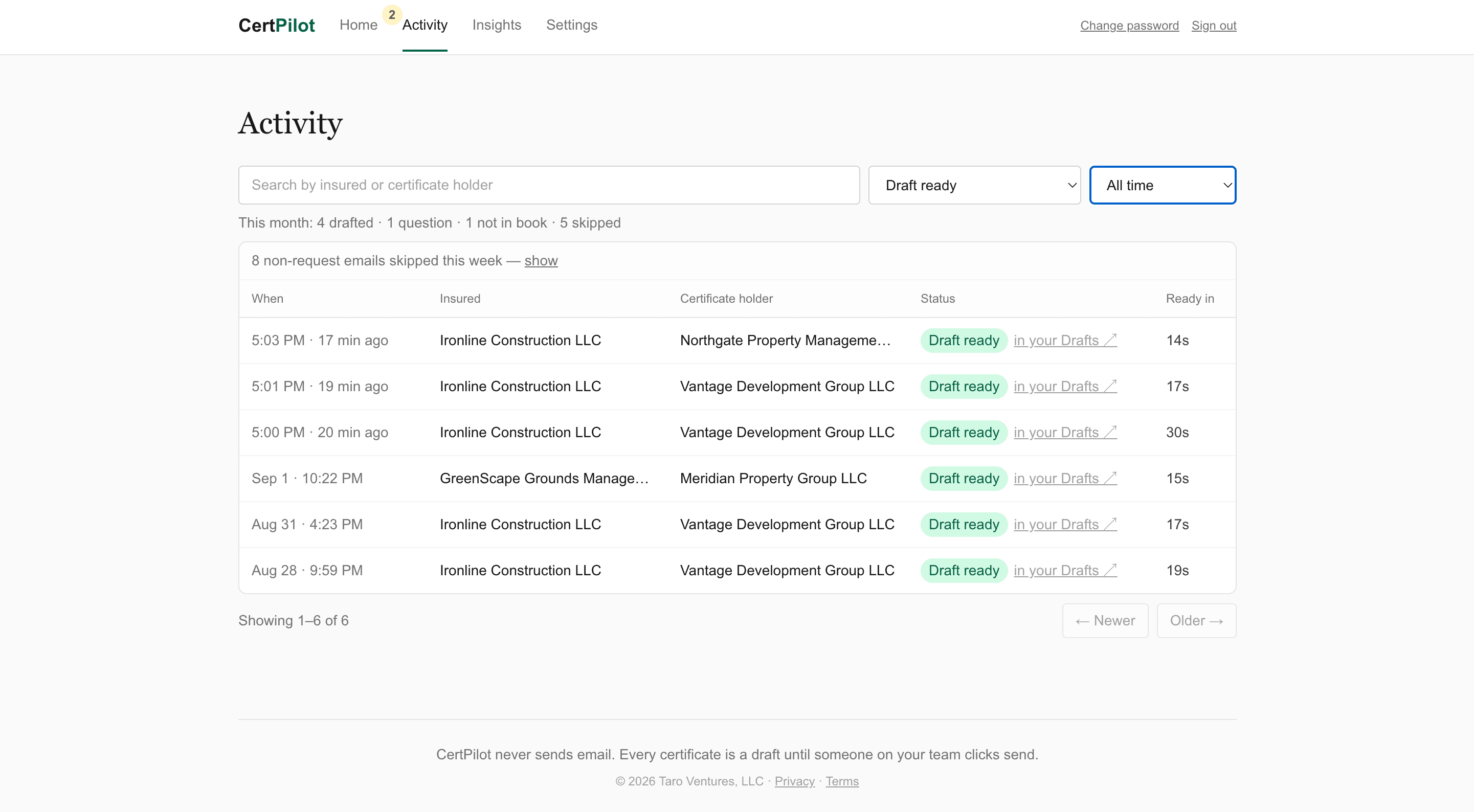
Every request, every draft, and its outcome, timestamped in a dashboard you can open any time.
Honest scope
What it handles, what it ignores, what goes to your team
CertPilot handles
- Standard COI requests
- Additional insured
- Waiver of subrogation
- Certificate holder details
CertPilot ignores
- Newsletters
- Marketing mail
- Anything that isn’t a certificate request
Goes to your team
- Clients it can’t match
- Ambiguous requests
- Non-standard wording
- Anything it isn’t sure about
The dashboard
See exactly what it’s doing
FAQ
Questions agencies ask first
Do we have to change our management system?
No. CertPilot works from your certificates inbox and your book of business. Nothing about your AMS, your carriers, or your process changes.
What if the requester’s client isn’t ours?
It gets flagged for your team with a note explaining why. CertPilot never produces a certificate for a client it can’t confidently match.
We’re on Outlook / Gmail — does it work?
Both. CertPilot supports Google Workspace and Microsoft 365.
How long does setup take?
About a day. Your admin approves one access grant, we load your book of business, and CertPilot starts from that day forward — it never reaches back into old mail.
What does it cost?
A flat monthly rate with a set number of certificates included. We’ll walk through pricing on the call once we understand your volume.
Who else can see our data?
No one. Your CertPilot instance runs for your agency alone — your credentials, your data, nothing pooled or shared.
Watch it fill a certificate, live, on a call
Fifteen minutes: we’ll show you a request email becoming a reviewed-and-ready draft, answer the E&O questions, and you’ll know whether this fits your agency. No deck, no pressure.
Book the 15-minute walkthrough